
Class macro
Knight Online Priest Macro
Hector heals your priest when HP drops: Superior Healing or Massive Healing, and Complete Healing when HP gets very low. It watches your party's HP too, and casts a group heal when enough members are hurt.
Your buffs and AC are recast from the support slots as they run out, for your party as well if you like. In between, it presses your attack skill as a Skill Combo.
What Hector does
 Skill Combo
 Auto Heal
 Party Heal
 Party Buff
 Auto Pot
Contents
Auto Attack
In the program: Bot settingsMacro
Presses your combo while the bot runs. You pick the combo, its skills and its speed. Combos differ by class; find yours below. Auto Key, which every class has, presses the skills you put in its slots in order, and can scan them when the bot cannot read your skill bar.
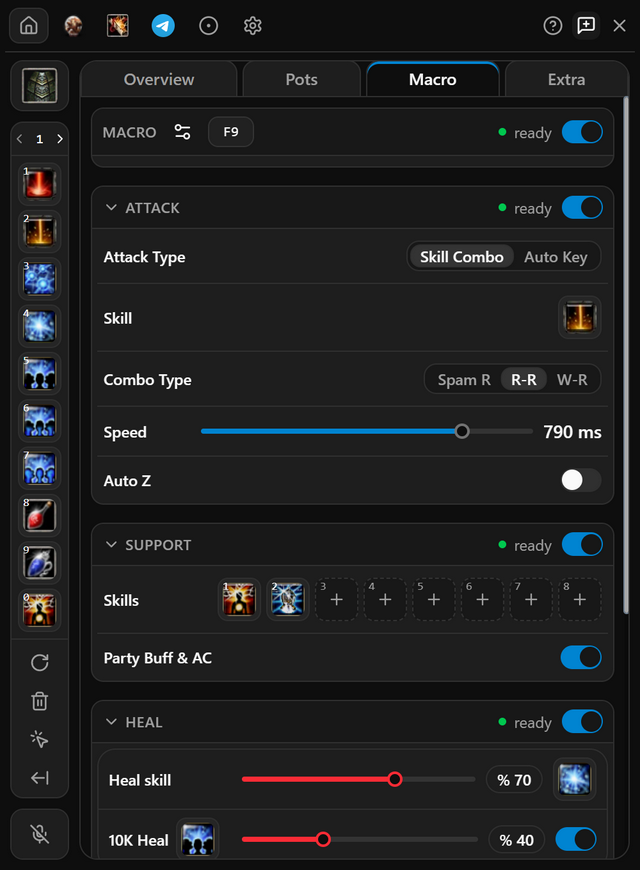
- Open Macro and pick Skill Combo under Attack Type.
- Right-click your attack skill on the skill bar; the combo presses one skill. Heal and support are on the same tab, in the sections below.
- Set Speed. A lower number presses faster.
- Switch on Attack at the top of the group.
- When it works
- While the bot runs, the Attack header reads running.
- If it does not
- A skill with an amber dot is not on your skill bar and cannot be pressed. Put it on the bar and reload skills.
Auto Heal
In the program: Bot settingsMacro
Heal yourself or your party when HP drops.
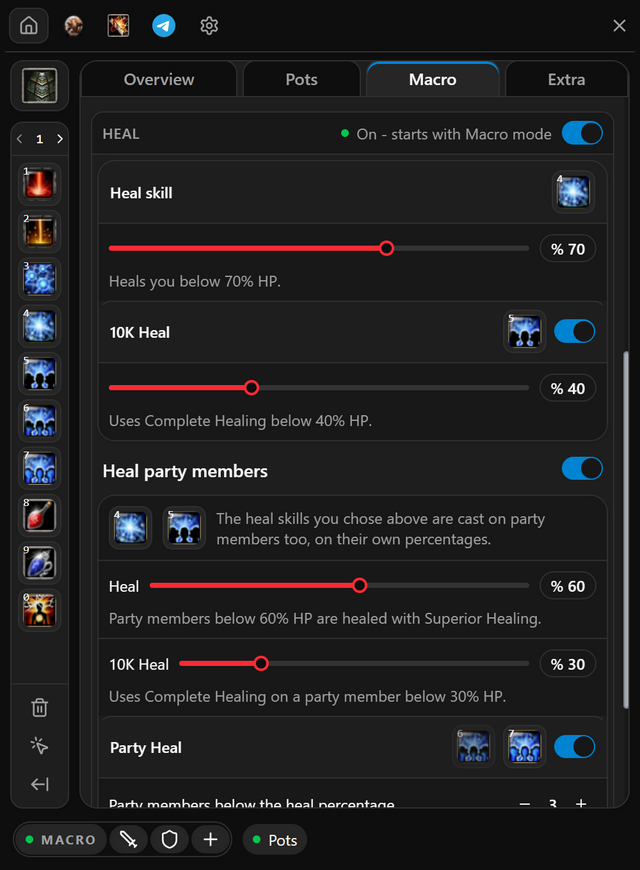
- Open Macro. Superior Healing is your Heal skill; to use Massive Healing, right-click it on the skill bar. Drag the slider on its line to the HP percentage you are healed at.
- Switch on 10K Heal and set its slider to use Complete Healing below that percentage.
- For the party, switch on Heal party members and set the card's own percentages. Add Party Heal to cast a group heal once enough of them are low.
- Switch on Heal at the top of the group.
- When it works
- Each slider's badge shows the HP percentage that heal goes out at. Folded, the party card still shows its percentages.
- If it does not
- A line saying a skill is not on the skill bar means it will never be cast. Put it on the bar and reload skills.
Auto Support
In the program: Bot settingsMacro
Keeps your buffs up while the bot runs. Each slot is cast again as it runs out or comes off cooldown.
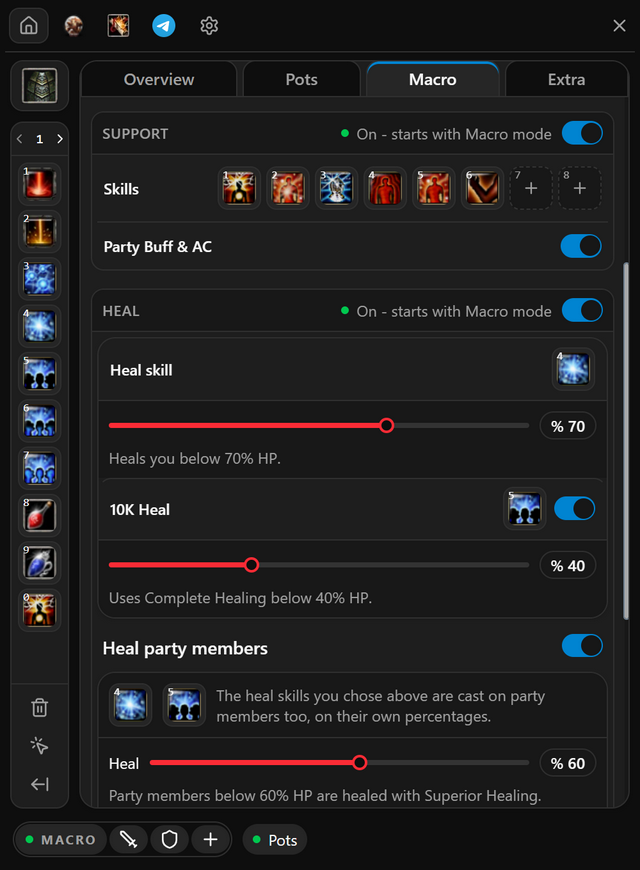
- Open Macro and right-click each buff or scroll on the skill bar. It lands in the first free Support slot.
- Drag slots to change the order. Ctrl-click a slot to empty it.
- Switch on Support at the top of the group.
For your class
 PRIEST
Switch on Party Buff & AC to buff your party as well.
- When it works
- While the bot runs, the Support header reads Running.
- If it does not
- A slot with an amber dot holds a skill that is not on your skill bar. Put it there and reload skills.
Auto Shield
In the program: Bot settingsExtra
Swaps your weapon for a shield when you are in danger, and back again once it passes.
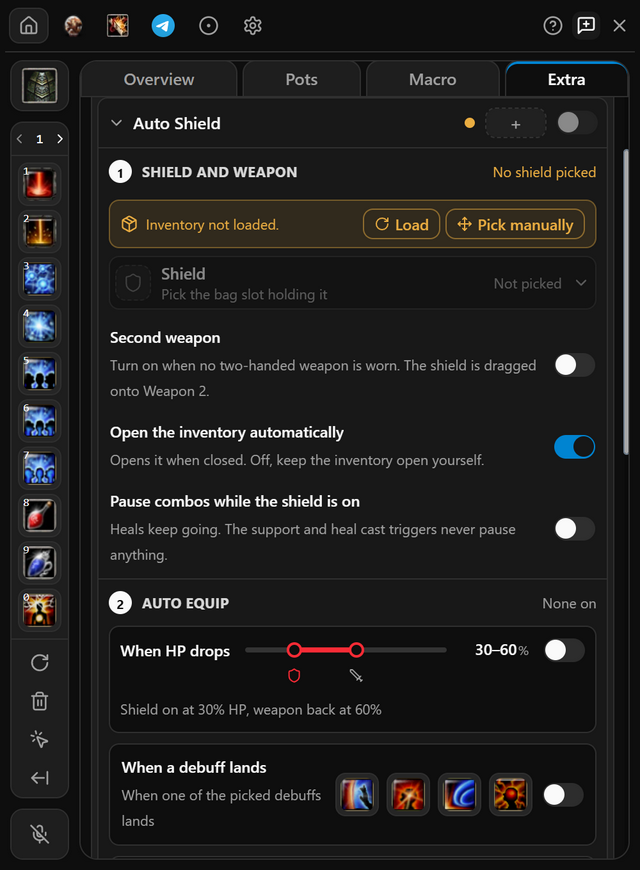
- Open Extra, click Auto Shield to unfold it, and press Load to read your bag.
- Under Shield, pick the bag slot your shield is in.
- Under Auto equip, switch on when it swaps: When HP drops or When a debuff lands. With HP, drag the two handles: the shield goes on below the first and the weapon comes back at the second. A priest can also shield While healing or While a support skill casts; these cover the heal and curse keys under Skill shortcuts too, and the shield button on a key’s row lets that one key cast with the weapon.
- Switch Auto Shield on. A key is optional, for swapping by hand. To stop attacking while the shield is on, switch on Pause combos while the shield is on; the attack picks up again once the weapon is back.
- When it works
- It shows in the Extra list on the Overview tab, with a green dot.
- If it does not
- An amber dot beside its key box means it has no key and no trigger yet. When HP drops also needs your bars read; press Read bars on the note it shows.
Questions
Does it heal my party?
Yes. Turn on Heal party members and set the card's own percentages. With Party Heal on, it casts a group heal when enough members are low.
When does it use Complete Healing?
With 10K Heal on, when your HP drops below the percentage set on its slider.
Does it buff my party too?
Yes. Turn on Party Buff & AC under auto support and the buffs go to your party as well.
Pricing
Pick the plan that suits you
Every plan includes all of the program's features. After payment, your one-time token is sent to your email address; use it in the app to create your account or extend your time.
Trial
Free
Three days
The code is emailed to you, and entering it in the app starts your three days. No payment is taken and no card details are asked for.
Weekly
33% off7 days
100TL
PurchaseWas 150 TLMonthly
20% off30 days
400TL
PurchaseWas 500 TL3 months
28% off90 days
900TL
PurchaseWas 1250 TL
Features shared by every plan
- Every feature unlocked: combos, auto pot, minor, heal, item upgrade and Telegram alerts.
- All five classes, from assassin to mage.
- Every update released while your plan is running.
- Your days start when you activate your token, not when you pay. Buy again before it runs out and the new days are added to the days you have left.
Pay through Shopier. Your card details are never used on this site.
For other payment methods, contact us: support@hectormacro.com