
Feature
Knight Online Change Equipment
Hector puts items from your bag on your character with a key, when a debuff lands or when your HP drops. An item it put on for low HP comes off again once your HP recovers.
Each card is its own list of swaps; add as many as you like and tie each one to its own moment.
Contents
Change Equipment
In the program: Bot settingsExtra
Moves items from your bag onto your gear, on a key, when a debuff lands or when your HP drops. Each card is its own list of swaps.
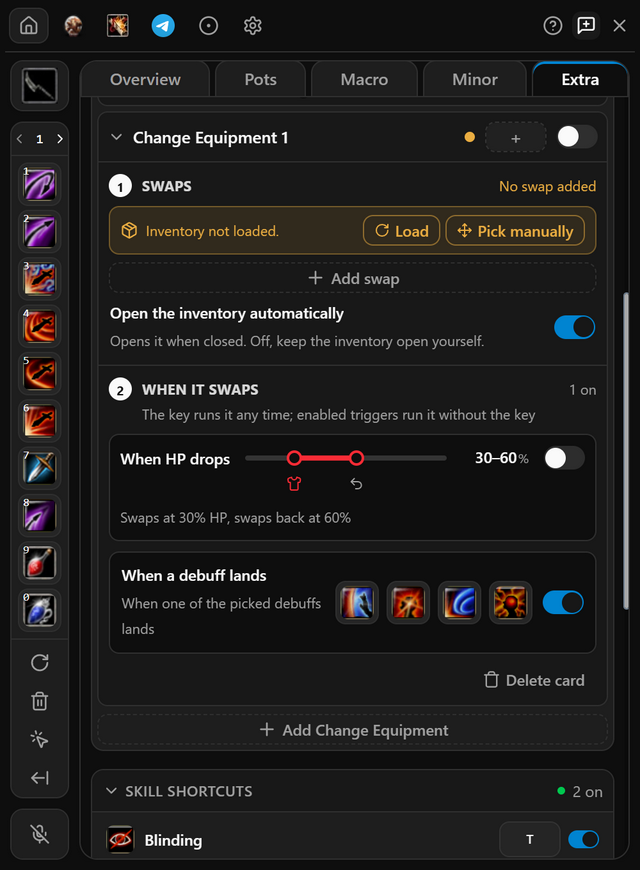
- Open Extra, press Add Change Equipment and click the new card to unfold it.
- Press Load to read your bag, then Add swap, and pick the bag slot to move. A right click lets the game place the item; switch the swap to drag and drop to pick the gear cell yourself.
- Choose when it swaps: set a key, or switch on When a debuff lands or When HP drops. With HP, it swaps back once your HP reaches the second line you set.
- Switch the card on.
- When it works
- It shows in the Extra list on the Overview tab, with a green dot.
- If it does not
- Only the HP trigger swaps back. After a key or a debuff, add a second card that moves the item back, on a key.
Related pages


Questions
When does an item swap?
When you press the card's key, when a debuff you picked lands, or when your HP falls below the line you set.
Does the item swap back by itself?
Only with the HP trigger: it swaps back once your HP reaches the second line. To undo a swap made by a key or a debuff, add a second card that moves the item back, on a key.
Can I pick which gear slot the item goes to?
Yes. A right click lets the game place the item; switch the swap to drag and drop to pick the slot yourself.
Pricing
Pick the plan that suits you
Every plan includes all of the program's features. After payment, your one-time token is sent to your email address; use it in the app to create your account or extend your time.
Trial
Free
Three days
The code is emailed to you, and entering it in the app starts your three days. No payment is taken and no card details are asked for.
Weekly
33% off7 days
100TL
PurchaseWas 150 TLMonthly
20% off30 days
400TL
PurchaseWas 500 TL3 months
28% off90 days
900TL
PurchaseWas 1250 TL
Features shared by every plan
- Every feature unlocked: combos, auto pot, minor, heal, item upgrade and Telegram alerts.
- All five classes, from assassin to mage.
- Every update released while your plan is running.
- Your days start when you activate your token, not when you pay. Buy again before it runs out and the new days are added to the days you have left.
Pay through Shopier. Your card details are never used on this site.
For other payment methods, contact us: support@hectormacro.com