
Help
Hector Macro Help
If something is not doing what you expect, find what you are seeing below and do what it says next to it.
Anything you cannot fix, send us as a ticket from inside Hector; you read our answer in the program too.
Contents
Something Not Working?
Find what you are seeing, then do what it says next to it.
- My keys do nothing in the game
- Open the bot lock with Del. Then check that the Macro box is on, and at least one row inside it.
- Connect cannot find my game
- Press Choose, then middle-click or Ctrl+right-click the game window. Hector remembers it for next time. If your server uses a different exe name, press the arrow next to Connect and pick Change exe name.
- A skill is never used
- It is not on your skill bar. Put it there in the game, then press Reload skills on the setup card.
- Pots come too late, or never
- Fill HP and MP in the game, then press Read bars on the Pots tab.
- The skill bar never changes page, and my character never moves
- Open Program settings, Game. Follow the Hector driver steps under Keyboard driver setup, then choose Hector driver under Keyboard.
- The minor key does nothing
- Open the bot lock with Del, and check that a key is set on the Minor box on Overview.
Send a Ticket
Tell us about a bug or an idea from inside Hector, and read our answer there.
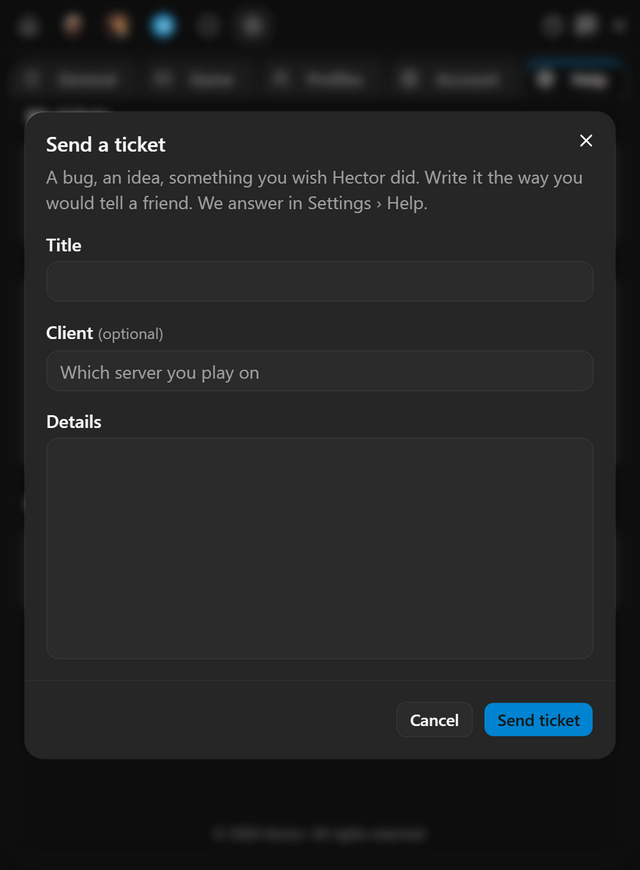
- Press Send a ticket at the top of the menu.
- Give it a Title and write what happened under Details. Add your server if it matters.
- Press Send ticket.
- Our answer arrives in Program settings, Help, under My tickets. When we reply, the ticket button turns into New reply; press it to read the answer.
- When it works
- Ticket sent shows, and the ticket is listed under My tickets.
- If it does not
- You can send 5 tickets a day. Past that, your draft stays until you can send it.
Questions
My keys do nothing in the game. What do I do?
Open the bot lock with Del. Then check that the Macro box is on, and at least one row inside it.
Where do I see the answer to my ticket?
In Program settings, Help, under My tickets. When we reply, the ticket button turns into New reply.
How many tickets can I send a day?
Five. Past that, your draft stays until you can send it.
Pricing
Pick the plan that suits you
Every plan includes all of the program's features. After payment, your one-time token is sent to your email address; use it in the app to create your account or extend your time.
Trial
Free
Three days
The code is emailed to you, and entering it in the app starts your three days. No payment is taken and no card details are asked for.
Weekly
33% off7 days
100TL
PurchaseWas 150 TLMonthly
20% off30 days
400TL
PurchaseWas 500 TL3 months
28% off90 days
900TL
PurchaseWas 1250 TL
Features shared by every plan
- Every feature unlocked: combos, auto pot, minor, heal, item upgrade and Telegram alerts.
- All five classes, from assassin to mage.
- Every update released while your plan is running.
- Your days start when you activate your token, not when you pay. Buy again before it runs out and the new days are added to the days you have left.
Pay through Shopier. Your card details are never used on this site.
For other payment methods, contact us: support@hectormacro.com